|
First time trying one of my Tutorials? Then please check my Terms of Use before you continue
Layer Merge FIX!!!
Ok have you ever gone to save an image with several layers as a pspimage or psd And you get a pop up saying the layers must be merged in order to save? I have and it used to be a pain in the butt til I worked out why it was doing it lol and here is the fix I came up with.
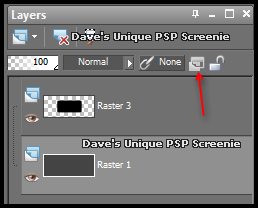
Ok when you try to save the image and you get that darn pop up click on cancel Now look over to your Layer Palette and highlight the Top layer You need to be looking at the following icon
Notice how it is faded? this means this layer is NOT the issue Click on each layer working your way down the palette until you notice that icon lights up like so
Ok now with this layer still hightlighted ... Layers> New Raster Layer Layers> Merge> Merge down ... Notice how now the icon is no longer light up? Thats it problem solved, now you can go ahead and save Hope you find this mini tut useful
Tutorial written on the 29th July 2012 ©David Hanslip |